Convert MMD to VRM — Japanese bones, physics and all, with a face that talks
MMD models are some of the best-made characters anywhere, and almost none of them can be a VTuber avatar as they are: PMX is not VRM, the bones are named in Japanese, the file carries its own physics, and the face is made for MMD's sliders rather than for a webcam. Every converter so far fixes one of those and leaves the rest to you.
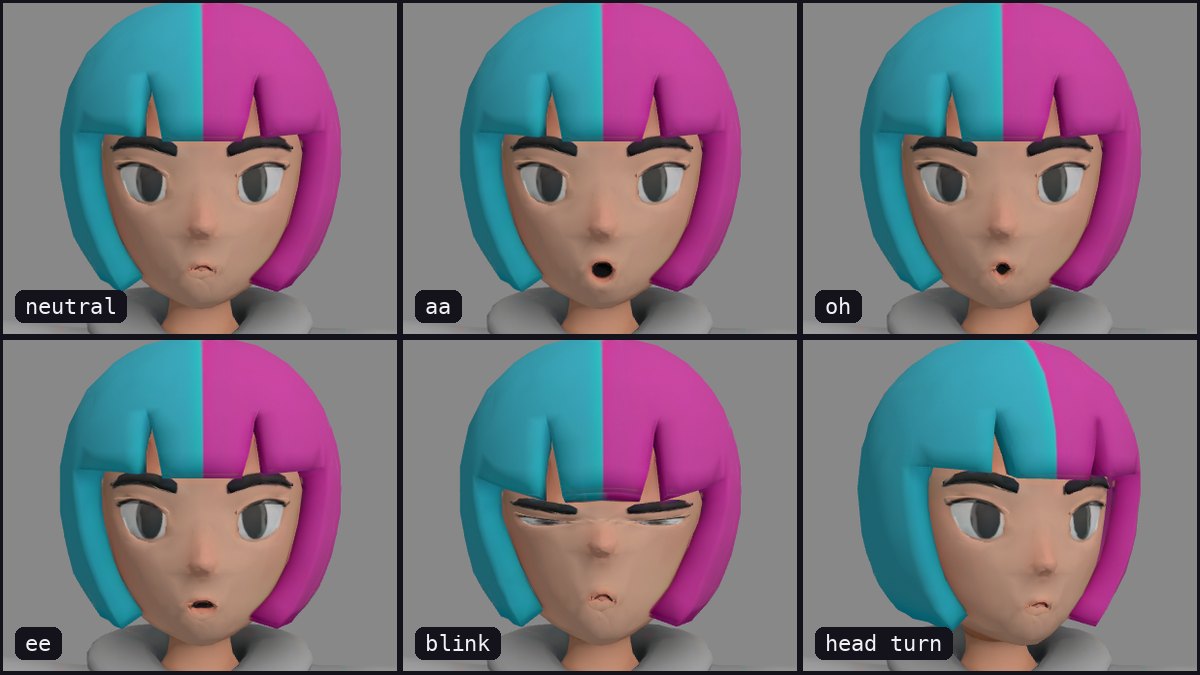
To convert an MMD model to VRM: open the .pmx in free Blender with the MMD Tools extension, export it as glTF Binary (.glb), and upload the GLB to Riggle. Japanese bone names, English MMD names and garbled names all work - no renaming. You get back a VRM 1.0 avatar that talks, blinks and shows emotions (the five mouth shapes aa, ih, ee, oh, ou, blink, happy, angry, surprised), and you watch a video of every expression before you download. Uploading and previews are free, the download costs 10 tokens, and the free plan's 10 monthly tokens cover one avatar a month. The Blender export is the one step outside the browser, because Riggle does not open .pmx files directly.
Why MMD models are hard to turn into VRM
Three things stand between a PMX and a working VRM. The bones are named in Japanese (左腕, ひざ), so most converters cannot find them. The physics - hair, skirt and sleeves - comes along in a form VRM does not use. And the face is made for MMD's own sliders, which VTuber apps do not know how to drive.
Desktop converters handle the format and stop there; users report corrupted files and lost textures. Doing it by hand in Unity with UniVRM works, and takes an afternoon.
Step 1 - export the PMX to GLB in Blender
- In Blender 4.2 or later: Edit > Preferences > Get Extensions, search for MMD Tools and install it.
- File > Import > MikuMikuDance Model (.pmd, .pmx) and choose the file. Keep the texture folder next to the PMX so the materials find their images.
- Press N to open the sidebar, open the MMD tab, and under Model Setup > Material click Convert to Blender. Skip this and the GLB comes out with no textures: MMD Tools' own materials do not export to glTF.
- File > Export > glTF 2.0 (.glb/.gltf), set Format to glTF Binary (.glb), and export.
You do not need to rename bones, delete the rigid bodies or fix the scale - MMD models are often ten or more units tall, and the avatar still comes out human-sized. If you found the model on Sketchfab, skip Blender: download it as GLB and upload that.
Step 2 - upload and preview
Drop the .glb into Riggle. Japanese names, English MMD names and names a converter has garbled into unreadable characters all work the same, and a model the file stores lying down comes out standing. Riggle shows you the face and asks you to point out the mouth and eyes - a few clicks - and about a minute later you watch every expression play back.
What you get back
The download is a VRM 1.0 that talks, blinks and shows emotions: the five mouth shapes (aa, ih, ee, oh, ou), blink with independent left and right winks, happy, angry and surprised. Before you pay anything, you watch a video of every expression playing on your own character.
What it does not do: the VRM does not carry MMD's physics or swinging hair, and it does not include MMD's full set of face sliders or the 52-shape ARKit set - see why perfect sync is a different job.
Before you stream as someone else's character
Use models you are allowed to use. Converting a character for your own avatar is one thing; streaming as someone else's character - a game studio's, an artist's - needs their licence. Sketchfab shows each model's licence on its page; most game rips have none.
Exported your GLB? Make it a VRM
Upload the GLB and see every expression play back before you download. Your first model each month is free.
Convert my modelFAQ
Can Riggle open a .pmx file directly?
No. Riggle accepts .glb and .vrm files up to 100 MB. Open the PMX in free Blender with the MMD Tools extension and export it as glTF Binary (.glb) first - or, if the model is on Sketchfab, download its GLB.
My model's bone names are in Japanese. Is that a problem?
No. Japanese names, MMD's English names and names that have been garbled into unreadable characters all work, with no renaming.
What happens to the physics (hair, skirt)?
The VRM does not carry MMD's physics. The hair and skirt keep their shape and move with the body; they do not swing.
Does it keep the textures?
Yes, if you click Convert to Blender (MMD tab, Model Setup, Material) before exporting - MMD Tools' own materials do not export to glTF, so without it the GLB has no textures. If the model is grey in Blender even before that, put the texture folder next to the PMX and import again.
Will the VRM work in my VTuber app?
Riggle exports VRM 1.0. Apps that read VRM 1.0 load it as-is; some VTuber software still only reads the older VRM 0.x and will refuse a 1.0 file. Check which version your app supports first.
How much does it cost?
Uploading, re-running and every preview are free. Downloading a finished VRM costs 10 tokens, once per model, and the free plan includes 10 tokens a month - one finished avatar a month at no cost.