Convert GLB to VRM — a rigged .glb in, a VRM 1.0 out
A GLB and a VRM are closer than they look: a VRM is a glTF binary with an extra layer that says which bone is the head, which morph is the blink and how the mouth makes each vowel. The conversion is filling in that layer - and the face is the part no converter can guess.
To convert a GLB to VRM, the GLB has to be rigged: a humanoid skeleton with the mesh skinned to it. Upload that .glb (up to 100 MB) to Riggle, spend about twenty seconds marking the lips and eyes on a front view of the face, and download a VRM 1.0 with the humanoid bones mapped, five visemes, blinks and three emotions - no Unity, UniVRM or Blender. An unrigged GLB cannot be converted by anything; rig it first in Tripo, Meshy or Mixamo.
What a VRM adds to a GLB
VRM is glTF 2.0 with a set of extensions on top. The mesh, the textures and the skeleton carry over unchanged. What the conversion has to add is meaning: a humanoid bone map (this joint is hips, that one is leftUpperArm), an expression set (which morph target is aa, which is blink), look-at settings for the eyes, and the avatar's metadata.
The bone map is mechanical once the skeleton is sane. The expression set is the hard part: a GLB from an AI generator or an auto-rigger almost never contains a single morph target for the face, so there is nothing to bind. Someone has to build the mouth shapes - which is why the usual answer is Unity, UniVRM and an afternoon of BlendShape clips.
Check your GLB before you upload
- It has a skeleton. Open it in any glTF viewer and look for bones, or check that the exporter's skeleton or skin option was on. A GLB with no skin is a statue - Riggle refuses it at upload and tells you so.
- It is humanoid. Two arms, two legs, a head on a neck. Stylised proportions are fine; quadrupeds are not, because VRM's bone map has nowhere to put them.
- It is not meshopt-compressed. Files run through gltfpack or an "optimise for web" step often are; re-export without mesh compression.
- The mouth is open, ideally. Riggle builds its best visemes from a mouth that was modelled open, with teeth and depth behind them - see why an open mouth decides your visemes.
Units, facing direction, A-pose versus T-pose and a leftover animation clip do not matter: Riggle returns the model to its bind pose, measures and rescales it, turns it to face forward and bakes an A-pose to a T-pose before anything else happens.
The conversion, step by step
Upload the .glb. Riggle maps the skeleton onto the VRM humanoid bones - it recognises the Mixamo, Tripo, VRoid and Character Creator naming conventions and falls back to matching by name pattern and hierarchy - and renders a straight-on view of the face. Then it asks you for five things:
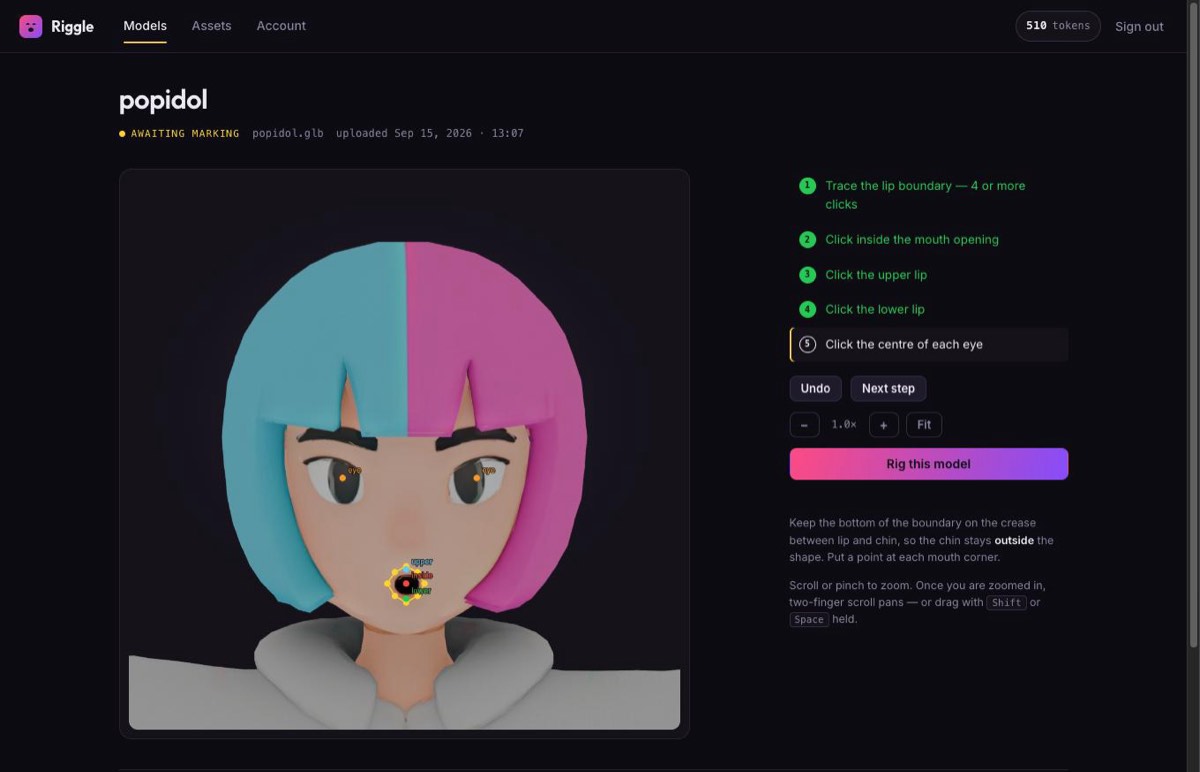
- Trace the lip boundary - four or more clicks around the outer edge of the lips, with a point at each corner and the bottom edge on the crease above the chin.
- Click inside the mouth opening.
- Tag the upper lip, then the lower lip - one click each.
- Click the centre of each eye - this pins the blink.
Press Rig this model and wait about a minute. If the result is not right, mark it again - re-marking is free and unlimited.
What you get back
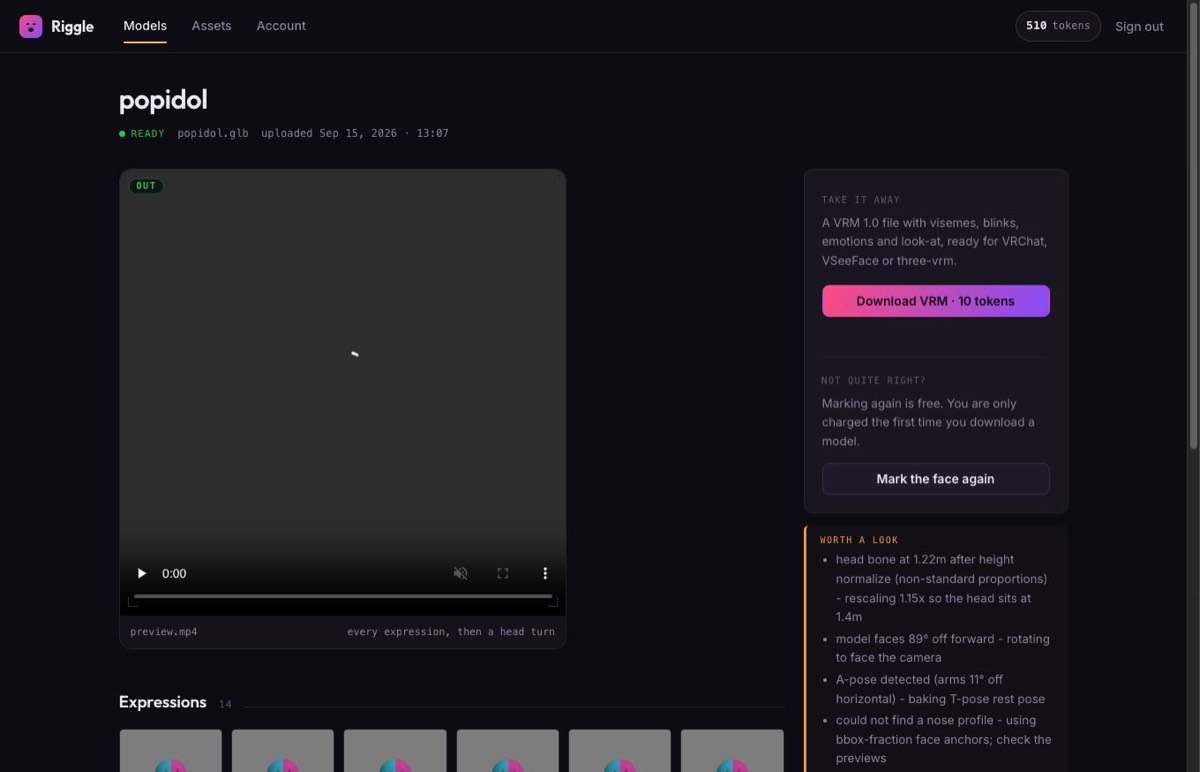
The download is a VRM 1.0 with the humanoid bones mapped and the expression set bound: the five visemes (aa, ih, ee, oh, ou), blink with independent left and right, happy, angry and surprised, and eye look-at when the rig has eye bones. Before you pay anything, Riggle loads the file in a real VRM renderer, drives every expression, and shows you a video of the whole set - an expression that exists but does not visibly move is flagged rather than shipped.
What it does not do: it does not rig an unrigged mesh (the skeleton has to be there already), it does not build the 52-shape ARKit "perfect sync" set - see why perfect sync is a different job - and it cannot invent teeth and a mouth cavity that were never modelled. A character whose mouth was generated closed still converts, but its visemes are a softer procedural approximation.
Where your GLB came from changes nothing - almost
The steps above are the same for every source. The differences are all upstream, in how you get a rigged GLB out of the tool you used: Meshy and Tripo (the AI image to VRM guide) export one directly; Mixamo and most marketplaces hand you an FBX, which needs one conversion to GLB first. If you already have a VRM and only want the face fixed, upload the .vrm itself - see adding visemes and blinks to a VRM.
Turn your GLB into a VRM
Upload the rigged .glb, mark the face in twenty seconds, and watch every expression play back before you download. Your first model each month is free.
Convert my GLBFAQ
Can I convert a GLB to VRM without Unity?
Yes. Riggle does the whole conversion in the browser: upload the rigged .glb, mark the face, download a VRM 1.0. The processing runs on our servers in Blender; you never install Unity, UniVRM or Blender.
My GLB has no bones. Can it still become a VRM?
No - a VRM is a rigged humanoid by definition, and Riggle does not create skeletons. Rig the model first: Mixamo's auto-rigger is free for humanoid meshes, and Tripo and Meshy can rig their own generations. Then upload the rigged GLB.
Does it output VRM 0.x or VRM 1.0?
VRM 1.0 only.
What is the file size limit?
100 MB per upload. Large files are usually large because of textures; downscaling 4K textures to 2K is the quickest way under the limit.
Will the expressions actually move?
You see before you pay. Riggle renders every expression in a real VRM renderer, compares each against the neutral face, and shows you a video of the full set - expressions that do not visibly move are flagged.
Will the VRM work in my VTuber app?
Riggle exports VRM 1.0. Apps built on three-vrm, and other software that reads VRM 1.0, load it as-is; some VTuber software still only reads the older VRM 0.x and will refuse a 1.0 file. Check which version your app supports before you plan a stream around it.
How much does it cost?
Uploading, marking, re-marking and every preview are free. Downloading a finished VRM costs 10 tokens, once per model, and the free plan includes 10 tokens a month - one finished avatar a month at no cost.