Sketchfab model to VRM — download the GLB, get a talking avatar
Sketchfab is where people find characters: anime, game, original, rigged and not. Its downloads are glTF, and VRM is glTF underneath, so the format is never the hard part. What breaks is everything Sketchfab's converter does on the way out - and the face, which almost no model there has in a form a VTuber app can use.
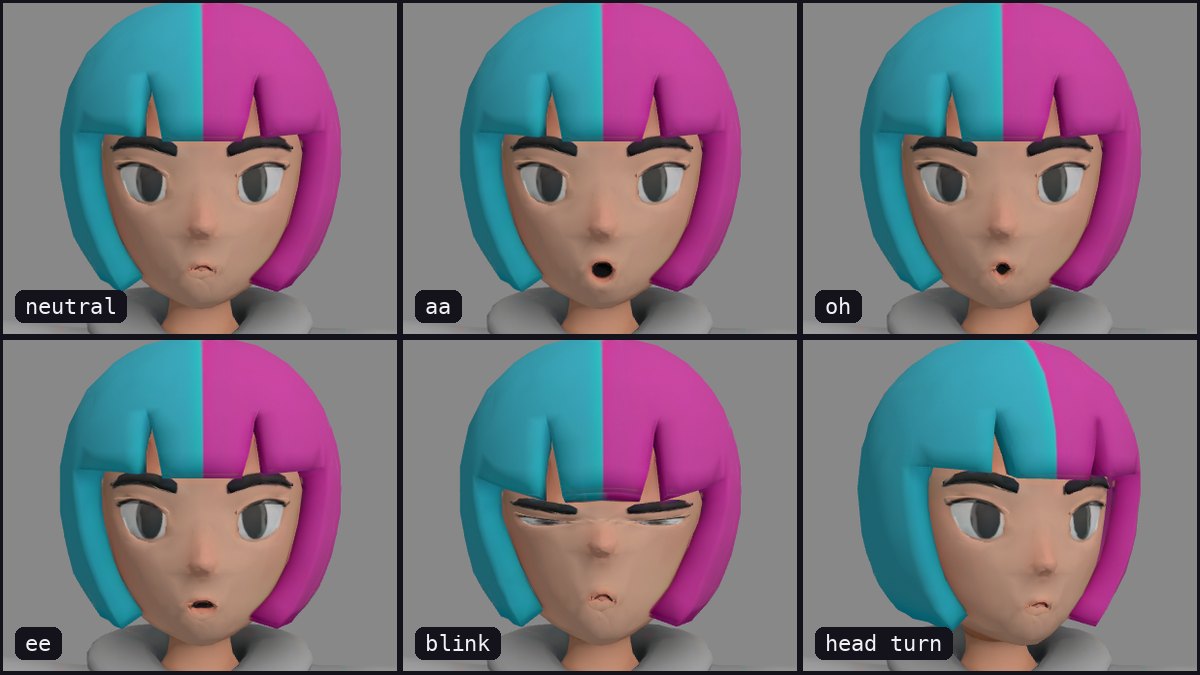
To turn a Sketchfab model into a VRM: on the model's page choose Download 3D Model, pick the GLB format, and upload the .glb to Riggle - rigged or not, up to 100 MB. No renaming, rescaling or fixing what Sketchfab's export did to the file. You get back a VRM 1.0 avatar that talks, blinks and shows emotions (the five mouth shapes, blink, happy, angry, surprised), and you watch a video of every expression before you download. No Blender, Unity or UniVRM. Uploading and previews are free; the download costs 10 tokens, and the free plan covers one avatar a month.
What Sketchfab's export does to a rig
A model you download from Sketchfab is not quite the file its author uploaded. Sketchfab re-exports it, and that tends to break other converters:
- Every bone gets a number:
HipsbecomesHips_51, so tools that look for Mixamo or VRoid names find none. - The size can be anything - the character can be centimetres or tens of metres tall.
- Names in Japanese or Chinese can arrive garbled, and some models arrive lying on their back.
None of this needs fixing before you upload. Riggle takes the GLB as it comes and gives you back a human-sized, standing avatar.
Step 1 - download the GLB
- On the model's page, click Download 3D Model (you need a free Sketchfab account, and the model must be downloadable).
- Choose GLB. It is one file with the textures inside; the other formats either split the textures out or need converting again.
Check the licence on the same page before you plan to use the character publicly.
Step 2 - upload and preview
Drop the .glb into Riggle. Rigs from Mixamo, VRoid, Character Creator, 3ds Max Biped, Auto-Rig Pro, Source engine and games with names of their own all work, and so do rigs with no meaningful names at all. A model with no skeleton works too: Riggle adds one and you check it on a front view. Then you point out the mouth and eyes - a few clicks - and watch every expression play back.
What you get back
The download is a VRM 1.0 that talks, blinks and shows emotions: the five mouth shapes (aa, ih, ee, oh, ou), blink with independent left and right winks, happy, angry and surprised. Before you pay anything, you watch a video of every expression playing on your own character.
What does not convert
VRM is a humanoid format: it needs a body with two arms that end in hands and two legs with a knee and a foot. Models that do not have that - four-legged creatures, characters with one bone per limb (Roblox's classic avatar), rigs with no hand or foot bones - cannot become a VRM avatar, and Riggle tells you what is missing instead of producing a broken file. Busts convert, but come out badly: pick a full-body model.
Use models you are allowed to use. Converting a character for your own avatar is one thing; streaming as someone else's character - a game studio's, an artist's - needs their licence. Sketchfab shows each model's licence on its page; most game rips have none.
Got the GLB? Make it a VRM
Upload it and see every expression play back before you download. Your first model each month is free.
Convert my modelFAQ
Which download format should I pick on Sketchfab?
GLB. It is a single file with the textures embedded, and Riggle reads it directly.
The model is not rigged. Can it still become a VRM?
Yes. Riggle adds a skeleton, you check it on a front view, and then it gives the character a face.
The bone names are numbered (Hips_51). Do I need to rename them?
No. Numbered names, and names that mean nothing at all, work as they are.
The model is huge or tiny. Do I need to fix the scale?
No. The avatar comes out at a standard human height whatever size the model was.
Will the VRM work in my VTuber app?
Riggle exports VRM 1.0. Apps that read VRM 1.0 load it as-is; some VTuber software still only reads the older VRM 0.x and will refuse a 1.0 file. Check which version your app supports first.
How much does it cost?
Uploading, re-running and every preview are free. Downloading a finished VRM costs 10 tokens, once per model, and the free plan includes 10 tokens a month - one finished avatar a month at no cost.